How To Fix Electronic Pill Dispenser Carousel Jamming?
An electronic pill dispenser makes life easier. It reminds you to take medicine on time. But sometimes, the carousel gets stuck.
Jamming can feel frustrating. You need your medication, and the device won’t cooperate. Don’t worry though. This problem is common, and it’s usually easy to fix.
Carousel jamming happens for a few simple reasons. Something might block the pill tray. The battery could be running low. Sometimes, double lids or cups cause the issue.
This guide walks you through each step. You’ll learn how to safely inspect your device. We’ll show you how to spot common obstructions.
In a Nutshell
- Check for obstructions first. Open the device and look inside the pill tray. Remove any debris, crumbs, or foreign objects blocking the rotation.
- Inspect the battery level. A low battery often causes the carousel to stop moving. Replace it right away if power seems weak.
- Look for double lids or cups. Using two lids or cups by mistake can jam the mechanism. Make sure only single lids are in place.
- Never force the tray while it sits in the case. This can permanently damage the internal parts. Always remove the tray completely before adjusting it.
- Test the carousel after each fix. Run a quick check to confirm smooth rotation. This helps you know if the problem is solved.
- Call support if issues continue. Manufacturers like Lifeline offer phone assistance. They can guide you through advanced troubleshooting steps.
Understanding Why Pill Dispenser Carousels Jam
Pill dispenser carousels jam when something blocks the spinning motion. The carousel holds your medication doses and rotates to deliver the correct pill at the right time. When it gets stuck, the whole system stops working.
Internal obstructions cause most jamming issues. Pill fragments, dust, or debris can fall into the carousel mechanism. These small particles lodge between the tray and the housing. The motor tries to spin but cannot move freely.
Low battery power creates another common problem. Your dispenser needs enough energy to rotate the carousel smoothly. When the battery runs low, the motor loses strength. The carousel may jam because it cannot generate enough force to turn.
Double lids or cups also block rotation. Sometimes a lid gets placed incorrectly or two cups stack together. This creates physical interference. The carousel hits the obstruction and stops moving.
Mechanical wear happens over time with regular use. The carousel bearings may develop friction. Small parts can become misaligned. This gradual wear reduces smooth operation.
Improper assembly after cleaning causes problems too. If you recently cleaned your dispenser, parts may not fit back correctly. Misaligned components create friction points that jam the system.
Understanding these causes helps you troubleshoot effectively. Each issue has a specific solution. Start by examining what might block the carousel. Check if your battery needs replacement. Verify that all components sit properly in place.
Most jamming problems are fixable at home without calling for help. You simply need to identify which cause applies to your situation. Once you know the reason, the fix becomes straightforward. The next steps will guide you through each solution.
Signs Your Carousel Mechanism Is Jammed
Your pill dispenser sends you clear signals when the carousel starts jamming. Learning to recognize these signs helps you catch problems early before they worsen.
The most obvious sign is resistance when the carousel rotates. You press the button or turn the dial, and the tray moves slowly or stops completely. The motor may make grinding sounds or click repeatedly without advancing to the next compartment. This grinding noise tells you something is blocking the rotation.
Another sign is incomplete rotation. The carousel moves partway and then stops. It fails to advance to the correct medication slot. You may hear the motor running, but the tray doesn’t reach the position where it should dispense your pills.
Pay attention to unusual sounds coming from inside the device. Clicking, grinding, or scraping noises indicate internal friction. These sounds mean something is rubbing against moving parts or obstructing the mechanism.
Visual clues matter too. Look through any transparent sections of your dispenser. You may see pills or debris stuck between the carousel and the outer casing. Debris can lodge in tight spaces and prevent smooth rotation.
Check if the carousel feels stuck when you try to manually turn it. Never force it, but gentle pressure reveals resistance. A healthy carousel rotates smoothly with minimal effort.
Battery performance affects carousel movement as well. If the motor sounds weak or moves slowly, low battery power may be responsible. The carousel requires adequate power to rotate smoothly.
These warning signs appear before complete failure. Catching them early means you can fix the problem quickly. Act promptly when you notice any of these signals to keep your dispenser working reliably.
Step-by-Step Guide to Diagnosing the Jam
Start by powering off your pill dispenser completely. Remove the battery to reset the system fully. This simple step clears any temporary glitches that might be causing the jam.
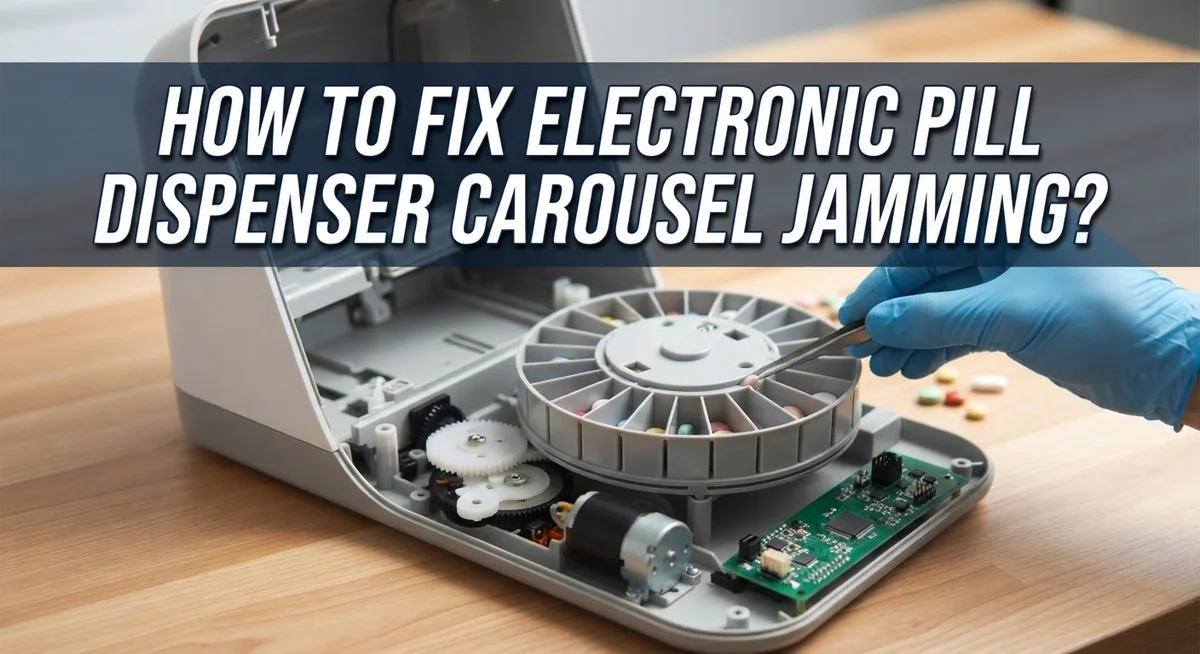
Next, open the device housing carefully. Most dispensers have a removable cover or access panel. Look inside the carousel chamber and inspect every visible surface for debris, dust, or pill fragments. Small particles often accumulate in corners and crevices.
Check the carousel tray itself. Remove it gently from the device if possible. Examine each medication cup for blockages. Look for broken pill pieces stuck inside cups or along the rotation track. Remove any foreign objects you find.
Inspect the carousel’s rotation mechanism closely. Look for bent components or misaligned parts that might prevent smooth spinning. The carousel should move freely without catching or grinding sounds. If you see damage, note it for later reference.
Verify that all lids and cups are single pieces. Double lids or stacked cups commonly jam the carousel. Remove any duplicates you discover. Ensure each medication cup sits properly in its designated slot.
Check the battery compartment next. Insert a fresh battery and note the voltage. Low battery power significantly reduces carousel rotation force. A weak battery might not provide enough energy to spin the carousel smoothly.
Reassemble the tray carefully. Make sure it clicks or locks into place properly. The carousel should sit level and centered within the housing.
Test the carousel manually by turning it gently with your finger. It should rotate without resistance. If it still feels stuck, repeat your inspection. Sometimes debris hides in unexpected spots.
Document what you find during inspection. Take mental notes of any unusual wear, damage, or problems. This information helps if you need professional support later.
How to Safely Clear Obstructions and Reset the Tray
Start by unplugging your electronic pill dispenser from the power source. Safety comes first when working with any electronic device.
Open the device housing by following your user manual’s instructions. Most dispensers have a removable top or side panel that gives you access to the carousel tray. Set all screws and small parts in a safe place so you don’t lose them.
Gently lift the carousel tray completely out of the device. Do not try to move it while it sits inside the case. This action prevents damage to the rotation mechanism underneath.
Inspect the tray carefully for any visible obstructions. Look for loose pills, debris, dust, or small objects wedged between the cups. Use a soft brush or cloth to remove any buildup gently.
Check each medication cup to ensure it has only one lid. Double lids or cups are a common cause of jamming. Remove extra lids carefully if you find any stacked together.
Examine the carousel’s base and the area where it rotates. Wipe away any dust or residue with a clean, dry cloth. Make sure nothing blocks the rotation path.
Replace the carousel tray back into the device, ensuring it sits flat and properly aligned. Reconnect the power and test the carousel by pressing the manual rotation button or running a test cycle.
If the carousel still feels stuck or won’t spin smoothly, remove the tray again and repeat your inspection. Sometimes obstructions hide in corners or under cup edges.
If jamming persists after these steps, contact the manufacturer’s support team. They can provide additional troubleshooting or arrange repairs if internal mechanical issues exist.
Checking Battery Levels and Power-Related Jams
Your pill dispenser’s battery is the power source that makes the carousel spin. When the battery runs low, the motor loses strength and the carousel stops rotating smoothly. This is one of the most common reasons for jamming issues.
Check your battery level first before assuming the carousel mechanism is broken. Most electronic pill dispensers have a battery indicator light or display. If the light appears dim or red, your battery needs attention. Some devices show a low battery warning on a screen or make a beeping sound.
To check the battery properly, locate the battery compartment in your device. This is usually on the back or bottom of the unit. Open it carefully and note the battery type. Common types include AA, AAA, or 9V batteries depending on your model. Look at the battery’s expiration date if one is printed on it.
Replace old batteries with fresh ones to restore carousel power. A weak battery cannot provide enough electrical current to move the motor. The carousel may spin slowly, hesitate, or jam completely when battery power drops below a certain level.
After installing new batteries, test the carousel manually by turning it gently with your finger. It should rotate smoothly without resistance. Then power on your device and run a test cycle. The carousel should spin at its normal speed.
If jamming continues after battery replacement, the problem lies elsewhere. The motor itself might be faulty, or obstructions could be blocking the tray. Return to your inspection steps and check the carousel tray for debris, stuck medication cups, or misaligned components. Document what you find so you can describe the issue accurately if you need to contact manufacturer support.
Common Mistakes That Worsen Carousel Jamming
Many people make mistakes that actually make carousel jamming worse. Understanding these errors helps you avoid causing more damage to your device.
Forcing the carousel is the biggest mistake. When you push or pull the tray hard, you damage the internal gears and motor. The carousel mechanism is delicate. Applying force can break the rotation system permanently. Always stop immediately if you feel resistance.
Another common error is leaving the tray inside the device while trying to reposition it. People think they can wiggle or adjust the carousel without removing it completely. This approach damages the housing and the tray’s connection points. You must always extract the entire tray before attempting any repositioning work.
Ignoring warning signs leads to bigger problems. If the carousel moves slowly or makes grinding sounds, these are early alerts. Continuing to use the device anyway causes the jam to worsen. Stop using it and inspect it right away.
Mixing up single and double lids causes frequent jamming. Some people accidentally install multiple lids on one medication cup. This creates extra thickness that blocks smooth rotation. Always verify each cup has only one lid attached.
Skipping the debris check is another mistake people make. They assume the jam is mechanical when actually small pills, dust, or packaging materials are blocking the tray. A quick visual inspection often reveals these obstructions immediately.
Never use tools to pry open stuck components. Screwdrivers and pliers scratch the device and break plastic pieces. Gentle hands work better than aggressive tools. If something won’t budge, stop and contact the manufacturer for guidance.
Preventive Maintenance Tips to Avoid Future Jams
Preventive maintenance stops carousel jamming before it starts. Regular inspections catch small problems early, so they don’t become expensive repairs.
Check your pill dispenser weekly for dust and debris. Wipe the exterior with a soft, dry cloth. This keeps particles from entering the device and blocking the carousel. Dust accumulation is one of the leading causes of jamming, so consistency matters here.
Clean the medication cups monthly. Remove them from the carousel and inspect each cup for residue or buildup. Dried medication particles can stick to cup surfaces and prevent smooth rotation. Rinse cups with water and let them dry completely before reinstalling them.
Keep your battery fresh at all times. Replace batteries every six months, even if the device still works. A weak battery struggles to power the carousel, which causes it to move slowly or jam unexpectedly. Fresh batteries ensure smooth, reliable operation every single time.
Store your pill dispenser in a dry location away from moisture and extreme temperatures. Humidity damages internal components and causes rust on metal parts. Temperature changes can warp plastic pieces and misalign the carousel mechanism.
Verify proper assembly after each cleaning session. Double check that each medication cup has only one lid. Multiple lids create friction that blocks rotation. Make sure the carousel tray sits flat and clicks into place securely.
Handle the device gently during daily use. Avoid dropping it or placing heavy objects on top of it. Physical impacts damage the internal gears that make the carousel spin.
Test carousel movement monthly by rotating it slowly by hand. It should spin smoothly without grinding sounds or resistance. If you notice any changes in movement, inspect the tray immediately. Early detection prevents complete jamming and extends your device’s lifespan significantly.
When to Contact Manufacturer Support
Your troubleshooting efforts have limits. Sometimes the problem requires professional help from the manufacturer. Knowing when to reach out saves you time and prevents further damage.
Contact manufacturer support when basic fixes fail. You’ve checked the battery, removed debris, and verified assembly. The carousel still jams? This signals an internal mechanical issue beyond simple maintenance.
Grinding or clicking sounds indicate gear damage inside the device. These noises mean the carousel mechanism needs professional inspection. Continuing to use the dispenser could worsen internal components.
If the carousel moves partially but stops mid rotation, the problem may be a worn motor or broken gear. Manufacturers have replacement parts and repair services for these issues. They can also determine if your device qualifies for warranty coverage.
Contact the manufacturer when you notice persistent resistance during manual carousel rotation. This feels different from normal resistance. The tray should spin smoothly with gentle pressure from your finger.
Document what you’ve already tried before calling. Tell them you checked the battery, inspected for obstructions, and verified assembly. Explain when the jamming started and how often it happens. This information helps support staff diagnose the problem faster.
Have your device model number and purchase date ready. Manufacturers use this information to access your warranty status and previous repair records.
Don’t attempt internal repairs yourself if you’re not trained. Opening sealed components voids warranties and risks breaking delicate mechanisms further. Professional technicians have the right tools and knowledge.
Manufacturer support exists for situations like this. They understand carousel jamming and can offer solutions you cannot perform at home. Reaching out is the smart next step when basic troubleshooting ends.
Final Thoughts
Fixing a jammed carousel does not need to feel stressful. Most jams happen because of small issues like debris, low battery, or double lids.
You can solve these problems quickly with a calm and careful approach.
Start by opening the device and checking the tray for obstructions. Remove any foreign objects you find inside.
Check the battery level next. A weak battery often causes the carousel to stop moving properly.
Confirm that you have used single lids or cups only. Double lids create pressure that blocks smooth rotation.
Remember to remove the tray completely before repositioning it. Never move the tray while it sits inside the case.
Patience matters more than force when dealing with a stuck carousel. Forcing parts leads to expensive damage that basic troubleshooting cannot fix.
Regular maintenance keeps your dispenser working smoothly for a long time. Weekly checks and monthly cleaning prevent most jamming problems.
Simple habits make a big difference in how well your device performs over time. A few minutes of care each week saves you from bigger headaches later.
If you follow these steps and the carousel still jams, do not hesitate to reach out for help. Manufacturer support teams understand these devices better than anyone else.
They can guide you through advanced fixes or arrange repairs when needed. Trying to fix internal parts yourself often makes things worse.
Your pill dispenser plays an important role in your daily health routine. Keeping it in good condition ensures you never miss a dose.
With the right care and quick action, most jamming issues become easy to resolve.
Frequently Asked Questions
Why does my carousel jam when I try to rotate it?
Jamming happens when something blocks the carousel from spinning freely. Debris, dust, or a stuck medication cup can cause this problem. Sometimes a double lid or cup gets placed in the dispenser by accident, and that creates friction too. Low battery power also stops the carousel from rotating smoothly.
How do I know if my battery is causing the jam?
A weak battery cannot power the motor enough to turn the carousel. Check your battery level first. If the device shows a low battery warning or the carousel moves very slowly, replace the battery right away. This simple fix solves many jamming issues.
Can I manually force the carousel to move if it’s stuck?
No. Do not manually move the tray while it sits in the case. Forcing it can damage the internal gears and motor. Always remove the tray completely from the device before you try to reposition it by hand. This protects the mechanism inside.
What should I do if I find debris in the carousel?
Open your device and inspect the pill tray carefully. Remove any dust, lint, or leftover medication pieces you see. Check each medication cup for buildup or residue. Clean the cups if needed. Make sure only single lids sit in each cup, never double lids. After cleaning, reassemble the device and test the carousel rotation.
What if these steps don’t fix the jamming?
Contact manufacturer support if basic troubleshooting fails. Have your device model number and purchase date ready. Tell them what you already tried. They can help you determine if the motor or gears need professional repair.
Hi, I’m Minnie Cole, the creator of The Output Lab — a space where I share my passion for all things tech. I spend my days exploring the latest gadgets, devices, and electronics on Amazon, putting them through real-world testing so you don’t have to.